VocalEngine
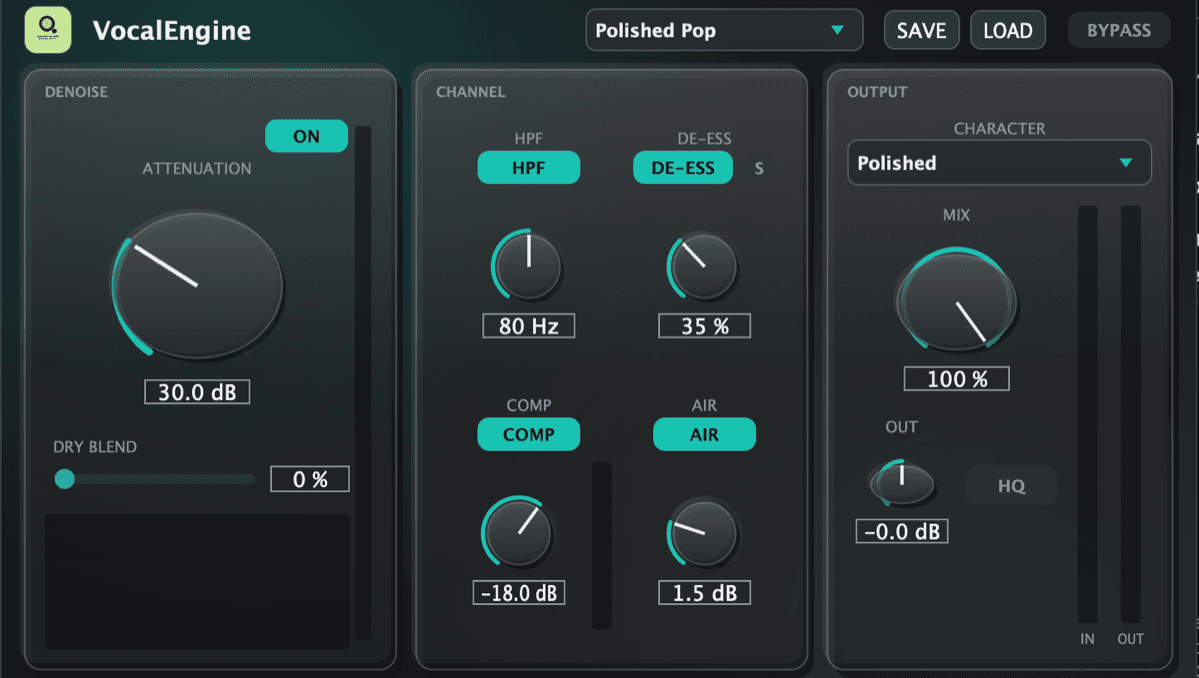
A complete vocal chain in one plugin — AI noise removal, high-pass, de-esser, compressor and air, in the order an engineer would use them.
$5.99 (₹503.16)
One purchase, three machines. Once activated it works offline — a licence check that needs the internet is a plugin that stops working on a plane.
Buy VocalEngineWhat it does
VocalEngine cleans up a vocal take the way an engineer would, in one pass and in the right order.
It opens with a Restore panel built around two big knobs, NOISE and ROOM. NOISE has two engines: NATURAL, the default, made for singing, removes steady room noise such as fans, air-con and hiss without graining held notes or vibrato; AI, built on DeepFilterNet, handles changing noise such as traffic and voices. ROOM is a de-reverb that shortens the room tail of bedroom and untreated-room recordings. LISTEN plays only what they remove, and a dry blend lets you keep as much of the room as you want.
What follows is a channel strip in the order that works: a high-pass filter to clear rumble, a de-esser with a listen mode so you hear exactly what it removes, an opto-style compressor, and an air shelf for the top end. The compressor and air stages run oversampled in HQ mode.
A global mix knob blends the whole chain against the dry signal, bypass is click-free, and input and output meters sit side by side so you can match levels rather than guess.
Specifications
- Version
- 0.4.0
- Formats
- Audio Unit, VST3, Standalone
- Architecture
- Apple silicon and Intel
- macOS
- 13.0 or later
- Download
- 81 MB
- Signing
- Signed and notarised by Apple
- Licence
- One account, three machines. Works offline.
Works in
- Logic Pro
- GarageBand
- FL Studio
- Ableton Live
- Cubase
- Reaper
- Studio One
Anything that reads Audio Units or VST3. Restart your DAW after installing — most only scan on a cold start.